Built-in due diligence tracking: Manage sell-side and buy-side workflows from your data room
Our newest feature, a comprehensive task management and workflow automation system, is built directly into virtual data rooms for M&A due diligence and deal preparation.
Live checklists, automated workflows, and real-time dashboards—built directly into DocSend Advanced Data Rooms.
TL;DR: DocSend Diligence tracker is a built-in task management system for M&A due diligence and deal preparation, designed for sellers, buyers, and advisors managing multiple concurrent deals. Create live checklists, assign tasks to internal and external teams, track critical deadlines, and monitor progress in real-time—all without leaving your data room. Result: faster deals, better collaboration, and confident stakeholder updates. Available now for Advanced Data Rooms.
Why built-in matters
M&A teams juggle spreadsheets, email chains, project management tools, and virtual data rooms simultaneously. When your diligence checklist lives in Excel, your documents live in a VDR, and your task tracking lives in a separate platform, critical items fall through the cracks.
The problem: Fragmentation creates blind spots. You're constantly switching contexts—checking Asana for task status, then jumping to your VDR to verify document uploads, then emailing stakeholders for updates. By the time you compile a board report, the data is already outdated.
The solution: Diligence tracking built directly into your data room. No context switching. No duplicate data entry. No version control nightmares.
You need a single command center where documents, tasks, stakeholders, and progress tracking coexist.
That's why we built Diligence tracker directly into DocSend Advanced Data Rooms.
Introducing Diligence tracker
Diligence Tracker is a comprehensive task management and workflow automation system built directly into DocSend's virtual data rooms. This isn't a separate tool you integrate—it's native functionality designed specifically for M&A due diligence and deal preparation workflows.
The core value: Centralize your documents, stakeholders, and tasks in a single view, bringing clarity, confidence, and accountability across teams. Instead of wondering what's happening across multiple tools, you have one unified workspace where everything lives.
Built for the complete transaction lifecycle:
Deal preparation: Organize pre-diligence checklists and stakeholder onboarding
Due diligence execution: Track document requests, Q&A, and review progress
Multiple concurrent deals: Manage several transactions simultaneously with isolated workflows
Internal and external collaboration: Coordinate your team, buyers, advisors, and third parties
Three-part value proposition: Mitigate risk. Accelerate deals. Simplify diligence.
For sell-side and buy-side workflows
Diligence Tracker is designed for both sell-side and buy-side workflows, supporting the full spectrum of M&A participants.
Sell-side teams (sellers & advisors)
When you're selling a company or raising capital, Diligence Tracker helps you:
Control the process: Create comprehensive diligence checklists before you open your data room. Define exactly what documents you need from internal teams, what information buyers must provide, and when critical milestones must be met.
Coordinate your team: Assign tasks to your CFO for financial models, legal counsel for contracts, operations leads for customer references—all tracked in one place with clear deadlines and status visibility.
Manage multiple bidders: Running a competitive process with three potential acquirers? Create separate task sets for each buyer, track their individual progress, and allocate resources to the most serious parties based on engagement data rather than subjective assessments.
Pre-qualify efficiently: Use Diligence Tracker to support pre-diligence workflows like pre-qualifying buyers and investor onboarding. Request proof of funds, NDAs, and preliminary materials before granting full data room access.
Meet critical deadlines: Set up automated reminders that identify bottlenecks before they slow your deal. When buyers miss deadlines, you know immediately and can address it proactively.
Buy-side teams (acquirers & investors)
When you're acquiring a company or conducting investment diligence, Diligence tracker helps you:
Organize your review: Build your own internal diligence checklist directly in the seller's data room. Track which documents your team has reviewed, flag issues for follow-up, and maintain your audit trail.
Coordinate specialists: Diligence involves lawyers, accountants, operations experts, and executives across time zones. Assign specific review areas to each specialist, track their progress, and ensure nothing is missed.
Request missing items: Need the target company to provide additional documents? Create tasks directly in Diligence Tracker specifying exactly what you need, where it should be uploaded, and when you need it.
Manage parallel evaluations: Evaluating multiple acquisition targets simultaneously? Each deal gets its own isolated Diligence Tracker workspace, preventing cross-contamination while maintaining consistent review processes.
Support post-merger integration: After close, leverage your diligence task history for integration planning. The complete record of what was reviewed, when, and by whom becomes invaluable for PMI teams.
For advisors managing multiple deals
Investment bankers, M&A advisors, and legal counsel managing multiple concurrent transactions benefit from:
Reusable templates: Create your standard diligence checklist once, then import it via CSV for each new deal. Build a library of proven templates for sell-side M&A, buy-side M&A, capital raising, and strategic reviews.
Consistent process across clients: Deliver the same professional experience to every client while customizing specifics for each deal. Your junior team members work from proven playbooks rather than reinventing processes.
Efficient resource allocation: With real-time dashboards showing which deals need attention, you allocate senior resources strategically rather than reacting to whoever calls loudest.
Key capabilities
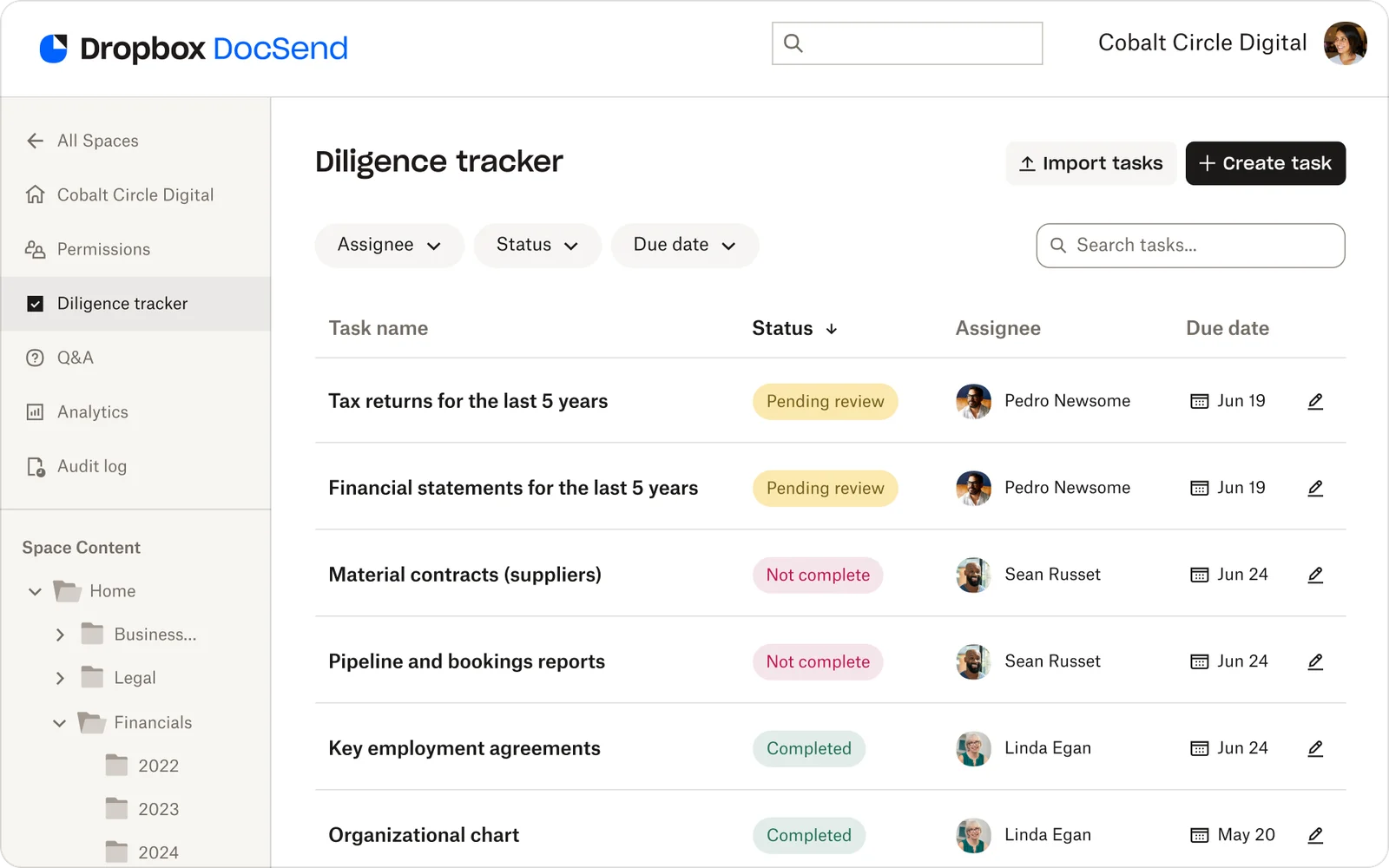
1. Live checklist management: Your central command for deal execution
Diligence tracker transforms static Excel checklists into live, actionable workflows integrated directly with your data room documents.
How it works:
Create tasks that include task name, description, assignee, due date, upload display location, and status. Each task represents a specific, trackable action—not vague intentions like "review financials" but concrete requests like "Upload audited financial statements for FY 2023-2025 in PDF format with all footnotes to the 'Financials/Historical' folder by March 15."
Task states provide clear visibility:
Requested: Task created, assignee notified, awaiting action
In Progress: Assignee actively working, you see movement
Complete: Deliverable provided, ready for review
Won't Do: No longer relevant, preserved in audit trail
Link tasks directly to data room folders: When you create a task requesting a specific document, you specify exactly where in your folder structure it should be uploaded. Assignees see the destination clearly, eliminating "where do I put this?" confusion.
CSV import for speed: Don't build checklists from scratch. Import your existing Excel templates with all task details, assignees, and due dates in seconds. This is especially powerful for advisors who've refined their checklists over dozens of deals.
Use cases:
Deal preparation: Before opening your data room, import your complete diligence checklist. Assign internal preparation tasks to your team with phased deadlines (e.g., "Draft confidential information memorandum by Feb 1," "Prepare management presentation by Feb 15").
Document requests: During active diligence, create tasks on-the-fly when buyers ask questions or you identify gaps. Assign to the right person, set the deadline, track completion—no email required.
Multi-party coordination: Need the same document from three competing bidders? Create their tasks and ensure they don't see each other's submissions. Perfect for competitive processes where confidentiality matters.
2. Bulk operations for scale: Manage hundreds of tasks efficiently
When you're tracking 200+ diligence items across multiple stakeholders, clicking through tasks individually isn't viable. Diligence tracker includes bulk management capabilities designed for complex deals.
How it works:
Select multiple tasks using checkboxes or filters, then update assignees, due dates, or statuses simultaneously. This isn't just a convenience—it's essential for maintaining momentum when deal dynamics change.
Common bulk operations:
Timeline adjustments: Buyer requests a two-week extension? Filter to all tasks due in the next 30 days, select all, extend dates by 14 days in one action. What would take an hour of manual updates happens in 30 seconds.
Team reorganization: CFO leaves mid-deal and is replaced? Filter to all tasks assigned to the departing CFO, bulk reassign to the interim CFO, add a note explaining the context. Continuity maintained without missing a beat.
Use cases:
Competitive process management: When Buyer A accelerates their timeline but Buyer B requests an extension, bulk update each bidder's tasks independently to reflect their different schedules.
Resource reallocation: When your tax advisor gets pulled onto another project, bulk reassign their 15 tasks to the backup advisor without individually editing each one.
Status synchronization: After a major document upload, bulk mark all related tasks as "Complete" rather than clicking through each individually.
3. Stakeholder task views: Give every participant clear direction
One of Diligence tracker's most powerful features is the assignee experience—how tasks appear to the people responsible for completing them.
How it works:
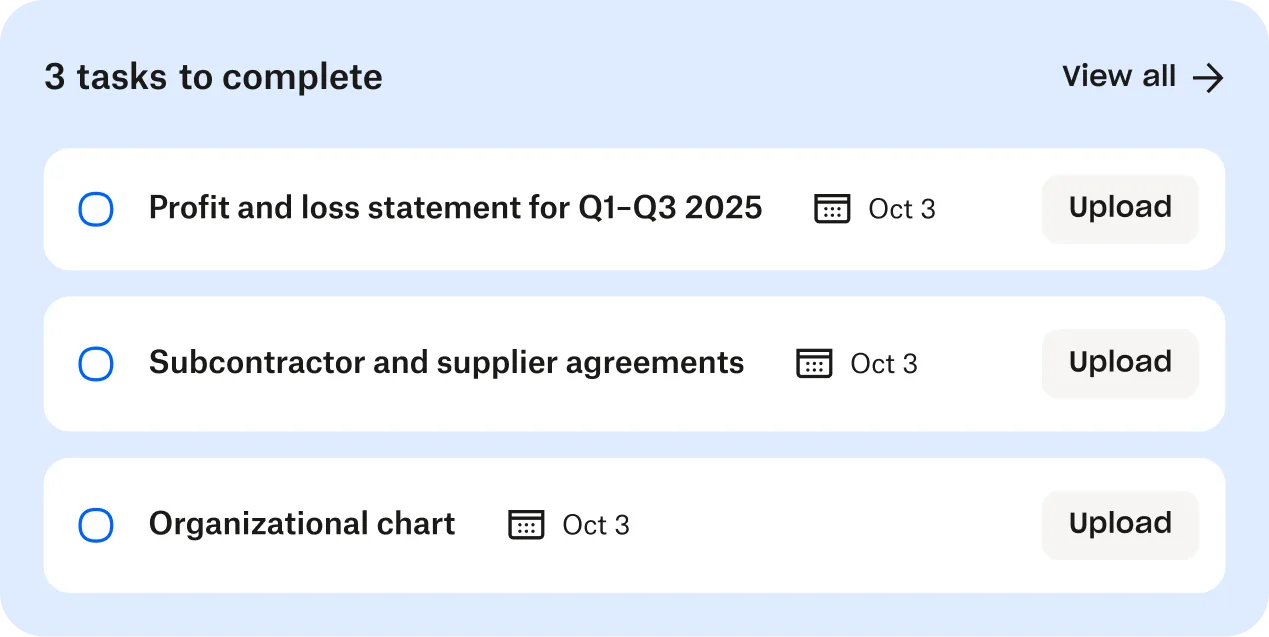
When someone is assigned a task, they see it prominently displayed when they access the data room. No separate login, no email attachment to track down—just open the data room you already have access to, and your tasks are waiting with complete context.
What assignees see:
Their personalized task list: Only tasks assigned to them, organized by due date, status, or custom filters. They're not overwhelmed by the full 200-task checklist—just their 8 action items.
Clear instructions: Task description explains exactly what's needed. Instead of "Submit financials," they see "Upload audited financial statements for FY 2023-2025 in PDF format. Include all footnotes, management discussion & analysis, and auditor's opinion letter. Due March 15, 2026."
Upload destination: The exact folder where their deliverable should go. They click "Upload to designated folder" and it goes to the right place automatically—no guessing, no emails asking "where should I put this?"
Status control: When tasks have not been addressed by the visitor, they are marked “Not started.” After the visitor uploads the requested documents, you can see “Pending review” and then mark it as “Complete” upon your review.
Use cases:
Buyer document collection: Instead of emailing buyers with Word doc attachments listing required documents, create tasks in Diligence tracker. They log into the data room, see their list—proof of funds, equity commitment letters, regulatory approvals—with clear deadlines and upload locations.
Internal team coordination: Your CFO sees "Prepare normalized EBITDA analysis" with a March 10 deadline. Your General Counsel sees "Provide material contracts summary" with a March 12 deadline. Your operations lead sees "Submit top 20 customer analysis" with a March 15 deadline. Everyone knows exactly what's expected and when.
Advisor collaboration: Your investment banker sees tasks related to buyer communications and process management. Your legal counsel sees tasks related to contracts and regulatory matters. Your accounting advisor sees tasks related to quality of earnings and working capital. Each specialist has clear visibility into their domain.
4. Automated deadline reminders: Keep critical paths moving
Manual follow-ups don't scale. When you're managing 200 tasks across 15 stakeholders, sending individual reminder emails is neither efficient nor effective. Diligence tracker includes automated deadline management that identifies bottlenecks before they slow your deal.
How it works:
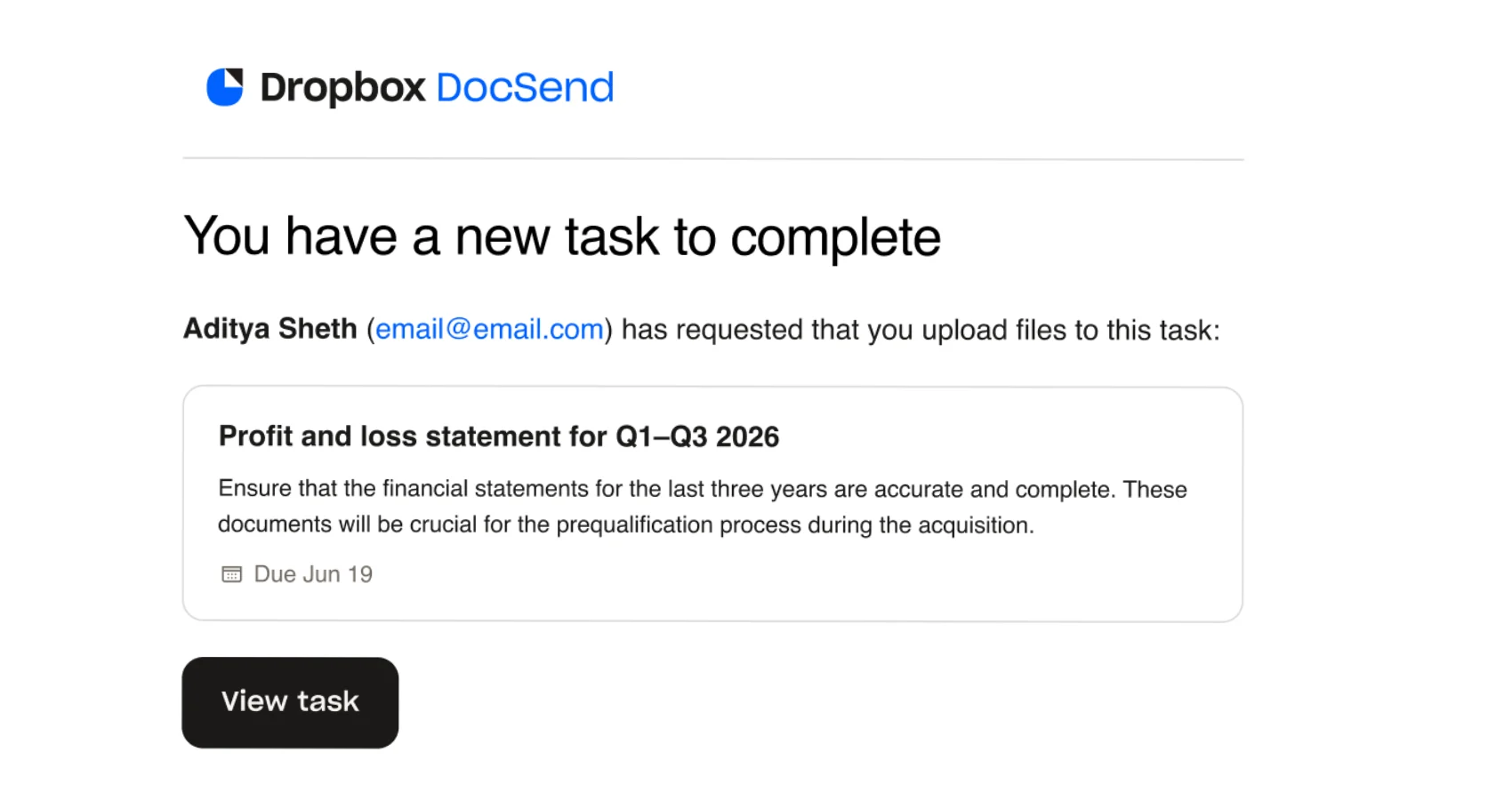
You define reminder rules based on due dates and task status. The system automatically sends professional, context-aware notifications that include everything the recipient needs to take action: what's required, when it's due, where to upload documents, and a direct link to their task list.
Reminder escalation patterns:
Advance warning: The day before or day of the due date, recipients are sent a gentle reminder.
Overdue follow-up: Overdue email reminders are sent every Friday for any incomplete tasks that have due dates between 7 days ago and yesterday, so you can keep the process moving without personal intervention.
How Advanced Teams Use It
Scenario 1: Rescuing Momentum When Engagement Drops
The situation: Software company in advanced acquisition discussions. After strong initial engagement, buyer activity dropped 60% over two weeks. Founding team considered price concessions to re-engage.
The insight: Insights from both Diligence tracker and Space analytics show that the buyers were actually stuck. The buyers were spending concentrated time reviewing tax-related documents, repeatedly accessing specific sections but not progressing to other diligence areas.
The action: Armed with this data, seller scheduled immediate call with buyer's CFO specifically about tax questions. Buyer had concerns about tax structure they were trying to understand internally before articulating.
The outcome: Within 48 hours of clarification call, buyer engagement returned to previous levels. Deal progressed to completion without price concessions. Visibility prevented a strategic mistake (unnecessary price reduction) and enabled a tactical fix (targeted clarification).
Lesson learned: Data-driven insight beats guesswork. Without tracking, sellers would have offered concessions when buyers really needed clarification. Dashboard transformed uncertainty into actionable intelligence.
Scenario 2: Optimizing Resource Allocation in Competitive Processes
The situation: Manufacturing company running competitive process with three potential acquirers simultaneously. Deal team couldn't objectively assess which buyer was serious—subjective interpretations ("Buyer A asks good questions") conflicted with resource constraints.
The insight: Created separate Diligence tracker workspaces for each buyer. Diligence tracker and space analytics provided objective data. Buyer A completed tasks and had high engagement across all functional areas. Buyer only concentrated only on financial documents. Buyer C had minimal activity despite multiple reminders. Task completion aligned with document viewing patterns—comprehensive engagement picture.
The action:
Resource reallocation: Dedicated senior team members to Buyer A (serious, thorough).
Direct conversation: Discussed Buyer B's financial focus, discovered internal ROI hurdles needed clearing before deeper engagement.
Performance requirement: Informed Buyer C that continued participation required demonstrated commitment via task completion.
The outcome: Buyer A received excellent support, submitted strong LOI. Buyer B appreciated transparency, withdrew gracefully when couldn't meet internal hurdles. Buyer C improved engagement when faced with potential elimination (didn't make final round).
Deal closed with Buyer A 25% faster than initial timeline because resources focused on serious buyer rather than spreading equally across tire-kickers.
Lesson learned: In competitive processes, objective engagement data beats subjective assessments. Track actual behavior (task completion, document review depth) rather than relying on "who seems interested."
Scenario 3: Eliminating Executive Time Waste on Reporting
The situation: PE-backed company being acquired by another PE firm. CEO needed weekly board updates on diligence status. CFO spent 5-7 hours weekly manually compiling information from folder checks, email threads, and team queries.
The insight: Configured their own weekly reports pulling information directly from Diligence tracker and Space analytics:
Overall completion by category (financial, legal, operational)
Tasks completed this week vs. total tasks
Critical items requiring attention (overdue tasks, upcoming deadlines)
Buyer engagement metrics (document views, questions asked)
The action: CFO's reporting process changed from 5-7 hours manual compilation to 30 minutes of reviewing analytics in DocSend and adding strategic commentary to their report. More importantly, ad-hoc questions during the week ("Has buyer reviewed our supplier contracts?") answered instantly via DocSend instead of requiring investigation.
The outcome: Over 12-week diligence process, CFO saved ~70-80 hours of manual reporting time by having all engagement analytics in one place. More valuable than time savings: accuracy improvement. Board appreciated consistent, professional updates and gained confidence in process control.
Lesson learned: Organization and automation frees executives for strategy and relationship management. Spend time analyzing and acting on data rather than collecting it.
Best Practices for Deal Teams
1. Define Success Criteria Upfront
Before opening your data room or creating your first task, establish clear parameters:
Comprehensive checklist: Cover financial, legal, operational, and strategic diligence. Be specific: not "financial statements" but "audited financial statements for FY 2023-2025 in PDF format with all footnotes."
Realistic timelines: Set firm deadlines based on overall deal timeline. Build in buffer for inevitable delays. Communicate deadlines to all stakeholders at outset.
Clear instructions: Provide specific completion criteria. Don't assume people know what's expected. "Upload customer concentration analysis showing revenue percentage from top 20 customers for past 3 years, with contract end dates and renewal status" is better than "provide customer information."
2. Monitor Engagement Patterns, Not Just Activity
Raw metrics mislead. Someone spending 30 seconds on 50 documents isn't as engaged as someone spending 30 minutes carefully reviewing 5 critical agreements.
Quality over quantity: Look for depth of engagement, not volume of activity.
Pattern changes matter: Buyer who was highly engaged then goes quiet may have encountered unstated concerns. Proactively reach out before it becomes a deal-breaker.
Decision-maker focus: CEO, CFO, or key decision-maker time investment is often the best predictor of genuine interest versus tire-kicking.
3. Use Data to Drive Proactive Communication
The real power isn't just knowing—it's acting on what you know:
Address concerns before they're voiced: If tracking shows buyer repeatedly returning to specific contract clauses, reach out proactively: "I noticed you've spent significant time on our customer contracts. I'd be happy to schedule a call to address any questions." Builds trust, prevents concerns from festering.
Anticipate questions: Heavy legal document review activity? Prepare answers to common legal questions in advance. Have your attorney ready. This preparedness demonstrates professionalism and accelerates process.
Strategic timing: Someone just finished reviewing all financial documents? Perfect time to offer a call with your CFO. Proactive outreach at the right moment can significantly accelerate deals.
4. Integrate Tracking with Deal Strategy
Tracking shouldn't exist in isolation—weave it into your deal workflow:
Decision-making: Use insights to inform negotiation strategy, resource allocation, timeline management. If Buyer A is much more engaged than Buyer B, allocate time accordingly.
Advisor alignment: Share relevant tracking data with lawyers, accountants, advisors. When they understand what's actually happening (not what they assume), they provide better guidance.
Team accountability: Tracking ensures follow-through when everyone knows tasks are visible. But balance accountability with support—use tracking to identify when team members need help, not just to call out failures.
5. Maintain Appropriate Confidentiality
Transparency is valuable, but not everything should be visible to everyone:
Thoughtful visibility: Not every stakeholder needs to see every task or metric. External buyers don't need to see your internal team's task list.
Security: Tracking information itself can be sensitive—reveals priorities, concerns, competitive intelligence. Ensure proper access controls.
Discretion: While tracking promotes accountability, be thoughtful about sharing completion metrics with external parties. You want buyers to see progress without highlighting every internal hiccup.
Getting Started
For Current DocSend Customers
If you're already using DocSend Advanced Data Rooms:
Use instantly: Navigate to your data room, activate select Diligence tracker in the left-hand toolbar. Integrates seamlessly with existing folder structure and permissions.
Works with active deals: No need to create new data rooms or migrate files. Enable for deals in progress right now.
Preserves security: Existing access controls, watermarking, and security settings remain unchanged.
Setup resources:
Step-by-step activation guide
Task creation tutorials
CSV import templates
Automated reminders
For New Customers
Exploring Advanced Data Rooms with Diligence tracker:
Included with Advanced Data Rooms: Diligence tracker is native functionality, not an add-on or integration.
14-day free trial: Test with real or simulated deals. We recommend actual upcoming transactions to experience full value in context.
Migration support:
Moving from another VDR? We provide:
File and folder structure transfer
Existing checklist conversion to Diligence Tracker format
Team training
Zero disruption to active deals
Rapid deployment: Most teams fully operational within 30 minutes. No complex IT setup, no lengthy training.
What You'll Need
Stakeholder roster: Everyone who'll need task assignments (internal team, buyers, advisors, legal, accounting).
Document structure: Map out your data room organization plan or review existing structure for task-folder alignment.
Diligence templates: Your standard checklists (sell-side M&A, buy-side M&A, capital raising) ready for CSV import, or use our provided templates.
Timeline milestones: Key dates—when does diligence start? Critical milestone dates? Category completion deadlines? Target close date?
Frequently Asked Questions
Q: How much does Diligence tracker cost?
A: Included with DocSend Advanced Data Rooms pricing. No per-task charges, no usage fees. When you have Advanced Data Rooms, you have full Diligence Tracker access. Visit our pricing page for current rates, or contact sales for volume/enterprise pricing.
Q: Can I enable Diligence tracker for an existing data room?
A: Yes. Works with both new and existing data rooms. All existing security settings, permissions, and watermarking remain intact.
Q: What are the main use cases for Diligence Tracker?
A: Diligence tracker streamlines structured document collection and tracking across multiple scenarios:
M&A and transactions: Coordinate buyer diligence requests, track internal document gathering, and manage stakeholder deliverables
Fundraising: Track investor due diligence requests, manage Q&A workflows, and monitor document submissions across multiple funding rounds
Enterprise sales: Organize security assessments, compliance questionnaires, and vendor diligence materials for prospects
Partnerships and business development: Manage partnership documentation, track mutual diligence exchanges, and coordinate legal reviews
Board reporting: Track preparation of board materials, manage committee requests, and organize audit documentation
Compliance and regulatory: Coordinate regulatory submissions, track document collection from multiple departments, and maintain audit trails
Any workflow requiring organized, trackable document collection and stakeholder coordination benefits from Diligence Tracker.
Q: What visibility do I have into task completion and activity?
A: Comprehensive visibility across your entire workflow:
Task status (not started, pending, complete, declined) for every item
Current assignee (assignment history also available in audit log)
Due dates (actual completion dates available in audit log)
Upload activity timestamps (available in audit log)
Historical activity (available in audit log)
Pending items requiring attention
View in dashboard, generate stakeholder reports, or drill into individual task details. Perfect for investor updates, internal status meetings, or team coordination.
Q: How does security work for Diligence Tracker?
A: Operates within DocSend's enterprise-grade security:
SOC 2 Type II certification
256-bit encryption for data at rest and in transit
Granular permission controls
Dynamic watermarking (Advanced Data Rooms)
Single sign-on (SSO) support
Two-factor authentication (2FA)
Detailed audit logs
You control exactly who sees which tasks. Assignees see only tasks assigned to them.
Q: How is this different from file requests?
A:
File requests are for when you need to collect files from anyone who visits your Space. You can configure who sees each file request, giving you control over which visitors are prompted to submit files.
Diligence tracker tasks are for direct, one-on-one assignments. Use these when you need to assign a task or request files from a specific person. Only the assigned individual will see their task, ensuring privacy and accountability.
Q: Can I coordinate both internal and external stakeholders?
A: Absolutely. Diligence tracker excels at managing workflows across different groups:
Internal coordination:
Assign tasks to legal, finance, operations, and other departments
Track which teams have submitted their materials
Monitor internal deadline compliance
Coordinate cross-functional document preparation
External coordination:
Share specific tasks with investors, buyers, partners, or auditors
Control what each external party can see and access
Track external submissions and responses
Manage multiple external stakeholders simultaneously (e.g., several investors in a funding round)
Q: How far back does tracking history go?
A: Captures all activity from the moment you enable it, visible in the audit log. Historical data persists for the data room's lifetime. Review task completion history, document upload timestamps, and access audit trails for compliance, investor reporting, or post-project analysis even after your project closes.
For data rooms created before Diligence tracker availability, activity is not retroactively tracked.
Q: Is this just for large companies or can startups and smaller teams use it too?
A: Designed for teams of all sizes. Many founders and startup teams find Diligence tracker especially valuable because:
Small teams wear multiple hats: Clear task assignment prevents things from falling through cracks
First-time fundraisers: Structured workflow helps navigate unfamiliar investor diligence processes
Lean operations: Automated reminders and status tracking reduce manual follow-up time
Professionalism: Organized diligence response builds investor confidence in your operational maturity
Learning for next time: Historical tracking helps you prepare better for future fundraising rounds
Whether you're a solo founder managing your first seed round or an M&A team coordinating a complex transaction, the task management and tracking capabilities scale to your needs.
Q: Can I use Diligence tracker for my specific needs?
A: Yes.
For M&A: Financial records, HR documents, IP documentation, customer contracts, operational metrics
For fundraising: Financial statements, cap table, customer references, technical documentation, legal documents
For sales: Security questionnaires, compliance certifications, case studies, technical specifications, pricing proposals
For partnerships: Legal agreements, technical integrations, compliance documentation, background checks
Conclusion: Command center for deal execution
Deal execution shouldn't require juggling spreadsheets, email chains, project management tools, and virtual data rooms simultaneously. When your tracking lives in one place and documents live in another, critical items fall through the cracks.
With Diligence tracker built directly into DocSend Advanced Data Rooms, you have a unified command center where tasks, documents, stakeholders, and progress tracking coexist. No context switching. No duplicate data entry. No version control nightmares.
Whether you're a seller coordinating multiple bidders, a buyer managing parallel evaluations, or an advisor running concurrent deals, visibility into execution status changes everything. You can identify bottlenecks before they slow your deal, provide confident updates to stakeholders, and focus your energy where it matters most—closing successful transactions.
Ready to Get Started?
For active deals: Use Diligence tracker in your existing DocSend data room today. Start creating tasks and tracking progress in minutes.
For upcoming transactions: Set up your data room with Diligence tracker before opening to buyers. Import your diligence checklist, configure your dashboard, launch ready.
For exploring solutions: See Diligence tracker in action with a personalized DocSend demo. We'll show you real deal scenarios and answer questions about fit for your specific workflow.
關於作者