Introducing MCP for DocSend: Bring your data rooms into your AI workflow
DocSend's new MCP server lets you query, summarize, and act on your live DocSend content from ChatGPT, Claude, or Microsoft Copilot—securely, without downloading documents.
Key takeaways
MCP for DocSend is a new integration that connects DocSend analytics and documents directly to AI assistants (ChatGPT, Claude, Microsoft Copilot, and Codex CLI) using the open Model Context Protocol (MCP) standard.
It lets you query, summarize, and act on live content from your AI assistant without downloading or re-uploading documents.
Every request is permission-aware: the assistant gets only the access the connected user already has.
Core use cases are engagement intelligence, meeting preparation, workflow automation, and audit/security review—built for fundraising, M&A diligence, and LP communications, and useful for any high-stakes document workflow.
MCP for DocSend is currently available to Dropbox DocSend Standard, Advanced, and Advanced Data Rooms customers.
Deal teams live in two worlds at once: the data room where sensitive documents, engagement signals, and permissions live, and the AI assistants where the actual work happens. Until now, those worlds didn't talk to each other. You'd copy findings into a chat, re-summarize the same documents, or switch tools just to answer a simple question about who's engaging with your content.
Today DocSend is closing that gap with MCP for DocSend, a new integration that connects your DocSend content, analytics, and data rooms (for ADR users) directly to the AI assistants you already use, including ChatGPT, Claude, and Microsoft Copilot. With MCP, your assistant can find and summarize content, answer questions about document engagement, and help you take the next step—all without manually downloading and re-uploading files.
It's a small technical shift with a big payoff: your DocSend content becomes part of a faster, more intelligent workflow.
What is MCP for DocSend?
MCP for DocSend is a Model Context Protocol server that gives AI assistants permission-aware access to your DocSend content. It lets your assistant query, summarize, and act on live content (engagement signals, documents, and access logs) without copying files into a chat or moving data between systems.
MCP (Model Context Protocol) is an open standard that lets AI assistants securely connect to external tools and data sources. Instead of copying documents into a chat or moving data between systems, MCP lets your assistant query, understand, and act on live information where it already lives. For DocSend, that means your AI assistant works from the real source of truth, not stale copies or re-uploaded files.
For financial services teams managing fundraising rounds, M&A diligence, and LP communications, this matters more than most. DocSend isn't just where sensitive documents live, it also provides insight into who’s interested, what they’ve reviewed, and how engagement is progressing.
How MCP for DocSend works
Three principles shape how the integration behaves, each one designed to keep you fast without compromising control.
Principle | What it means |
One connection, your assistant | Connect DocSend to ChatGPT, Claude, or Microsoft Copilot using the open MCP standard. No proprietary integration to maintain. |
Grounded in live content | Your assistant reads and acts on real DocSend activity and documents, not stale copies, not re-uploaded files. Responses stay grounded in current deal information. |
Permission-aware by design | Every request follows your DocSend permissions. The assistant gets the same access you do, nothing more. No elevated access, no exceptions. |
Which AI assistants are supported?
DocSend works with AI applications that support remote MCP servers, including ChatGPT, Claude, and Microsoft Copilot. If your assistant speaks MCP, it can talk to DocSend.
What can you do with MCP for DocSend?
Use the AI assistants you already work with to understand your DocSend content, see who’s engaging with it, and take the next step without switching tools. Four use cases cover most of the deal workflow.
1. Engagement intelligence: Know who's leaning in, and why
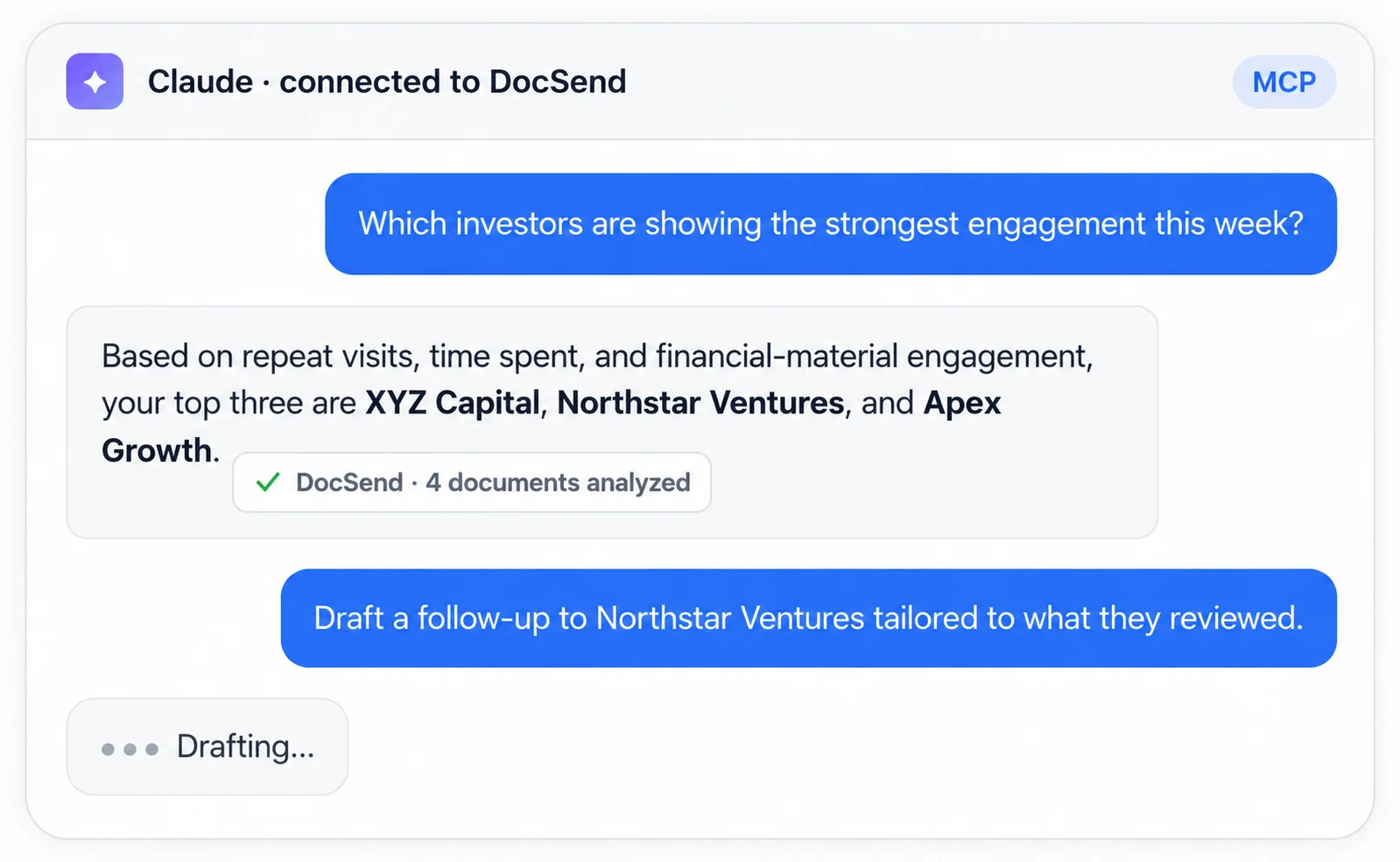
Turn document activity into signals about investor or buyer interest so you can focus on the most engaged opportunities first. In fundraising and dealmaking, intent is everything—the investor who revisits your financial model three times in a week is telling you something different than the one who skimmed the deck once.
Example prompts:
Which investors are showing the strongest intent this week?
Which investors revisited the financial model?
Which buyers spent the most time on the management presentation?
2. Meeting preparation: Walk into every meeting briefed
Your assistant can build context from the documents stakeholders reviewed and their recent activity, helping you identify potential focus areas and talking points before the conversation.
Example prompts:
Brief me on Northbridge before tomorrow's meeting.
What topics is this investor likely focused on?
What concerns might they have based on what they reviewed?
3. Workflow automation: Move from insight to action in one prompt
Draft follow-ups grounded in what an investor or buyer actually reviewed, and surface answers across live deal documents without manually searching through them. The jump from "I see engagement" to "here's the follow-up email" collapses into a single prompt.
Example prompts:
Draft a follow-up email based on the documents a buyer viewed.
Summarize buyer engagement over the last seven days.
4. Security by design: Stay in control of the deal
Every MCP interaction follows DocSend permissions, so teams can work with live information without downloading documents. For financial services teams operating under regulatory scrutiny, this is the feature that makes the rest of it usable.
Example prompts:
Who accessed the cap table this week?
Was there any unusual access to the legal diligence folder?
Summarize recent external access for our security review.
Is MCP for DocSend built for financial services?
MCP for DocSend was built with the realities of financial services and fundraising workflows front of mind. Fundraising teams juggling dozens of investor conversations, M&A advisors running parallel diligence tracks, and LP relations teams managing sensitive distributions all share a common need: to understand engagement, move fast, and keep an audit trail that satisfies compliance.
But the same capabilities serve anyone running a high-stakes document workflow: sales teams tracking buyer intent in a competitive evaluation, startups managing a fundraise, or any team that lives in DocSend and wants their AI assistant to meet them there. If your work involves understanding who's engaging with sensitive content and acting on it, MCP for DocSend brings that work into the assistant you already use.
Frequently asked questions
What is Model Context Protocol (MCP)?
MCP is an open standard that lets AI assistants securely connect to external tools and data sources. Instead of copying documents into a chat or moving data between systems, MCP lets your assistant query, understand, and act on live information where it already lives. DocSend's MCP server gives supported AI assistants permission-aware access to your data.
Which AI assistants are supported?
Any MCP-enabled assistant, including ChatGPT, Claude, and Microsoft Copilot. If your assistant speaks MCP, it can talk to DocSend.
How does MCP handle access permissions?
All MCP interactions inherit DocSend's existing security model. The assistant can only access content the connected user is already authorized to view—no elevated access, no exceptions.
How do I authenticate with MCP?
MCP uses secure, permission-based authentication tied to your DocSend account. When you connect your assistant, it uses the existing DocSend login and authorization flow and follows the same standards that protect your account.
Which plans can use MCP?
MCP is currently available to those with Standard, Advanced, and Advanced Data Rooms plans.
Can the receiver of a data room use the MCP server?
No. Visitors (recipients of shared documents) can't use the MCP server. The MCP server is for DocSend account holders: data room owners and team members who manage rooms, permissions, and engagement.
Does my data leave the room?
No. MCP lets your assistant query, summarize, and act on content that already lives in your DocSend account. There's no need to download or re-upload documents. Files stay where they're secure and permissioned.
Bring your data rooms into your AI workflow
MCP for DocSend is now available to Dropbox DocSend Standard, Advanced, and Advanced Data Rooms users. Connect your data rooms to ChatGPT, Claude, or Microsoft Copilot and start turning live deal content into your next step—without switching tools, downloading documents, or leaving your audit trail behind.
Om författaren