Beyond the Pitch: 7 high-stakes documents that need more than email
Email isn't secure enough for your confidential documents. Discover seven high-stakes business documents that demand proper document tracking software and security controls.
Email has become our go-to for sharing critical documents, and for good reason. It's fast, familiar, and works with the tools we already use every day. Executives share term sheets through Gmail. Board members distribute compensation details via PDF. M&A teams send confidential materials through Outlook.
But while email excels at communication, it wasn't designed as a secure document platform. Once you hit send, you lose visibility: you can't see who's accessing your files, control forwarding, or revoke access if circumstances change.
The good news? You don't have to choose between convenience and control.
Here's the uncomfortable truth: there's a massive gap between consumer file sharing built for photos and spreadsheets, and enterprise virtual data rooms (VDRs) built for $500M M&A deals. Most business documents live in this middle ground—too sensitive for casual sharing, but not complex enough to justify a six-figure VDR implementation.
This guide explores seven high-stakes business documents that fall into that gap, why alternatives to email attachments matter more than you think, and how modern secure document sharing for business works without the complexity.
The problem with email for confidential documents
Before we dive into specific document types, let's address why email fails for sensitive business communications.
Email's fatal flaws for business documents
1. Zero tracking capability
You can't track who opened your document, how long they spent reading it, or which pages held their attention. Did your investor read the financials section? Did the buyer skip your competitive analysis? Email won't give you this insight.
2. No forwarding control
Once you attach a PDF to an email, you've lost control. Your recipient can forward it to anyone (competitors, press, social media), and you'll never know. This is particularly dangerous for confidential M&A documents, partnership proposals, and pre-announcement product plans.
3. Impossible access revocation
Sent a document with outdated terms? That PDF now lives in someone's inbox forever. Unlike secure file sharing for business platforms with link expiration, email creates permanent, uncontrollable copies.
4. No identity verification
Email addresses can be spoofed. Even legitimate addresses might be shared accounts or forwarded to unauthorized team members. You have no way to verify who actually accessed your confidential information.
5. Compliance nightmares
Need an audit trail for regulatory compliance? Email doesn't provide forensic-grade logs showing who viewed what, when. This creates risk for industries with strict document security requirements like financial services and healthcare.
According to Verizon's 2025 Data Breach Investigations Report, 82% of data breaches involving confidential documents started with poor email security practices. The cost isn't just reputation—it's lost deals, regulatory fines, and strategic disadvantage.
The alternative? Modern document tracking software like Dropbox DocSend that combines security with intelligence, letting you share confidential documents with confidence while gaining actionable insights into recipient engagement.
7 documents that demand better than email
1. Confidential term sheets
The stakes: A poorly controlled term sheet leak can torpedo negotiations, alert competitors, or create regulatory issues if the deal involves public companies.
Why email fails:
No way to track if key decision-makers actually reviewed the terms
Can't revoke access if negotiations fall apart
No verification that the recipient is authorized to view financial terms
Zero visibility into which sections created concerns (longer view time = potential issues)
What you actually need:
The ability to track who opened your document and see exactly how long they spent on each page. When you're negotiating a partnership or investment, knowing that your counterpart spent 8 minutes on the valuation section versus 30 seconds tells you where to focus your next conversation.
You also need email verification gates that confirm recipient identity before granting access, and the ability to set document expiration dates—because terms change, and outdated documents floating around create confusion and risk.
Real-world example: A Series B startup sent term sheets to three potential lead investors using document view analytics. One investor spent significant time on the financials (12 minutes) but barely glanced at the team section (45 seconds). This insight prompted the founder to proactively address financial questions in the follow-up meeting, rather than spending time on team credentials the investor clearly wasn't concerned about.
Best practice: Use permission-based document access with email verification. Set 7-day link expiration for initial terms, longer for final agreements. Track engagement to prioritize follow-ups with genuinely interested parties.
2. Board materials & executive communications
The stakes: Board packets contain the company's most sensitive information—unreleased financials, strategic plans, M&A discussions, executive compensation, and competitive intelligence. A leak could violate fiduciary duties, trigger regulatory investigations, or give competitors a strategic roadmap.
Why email fails:
Board members often use personal email addresses with weaker security
No control when board members forward materials to advisors
Can't update materials after initial send (version control nightmare)
No proof of document review for governance compliance
What you actually need:
Board materials management requires multiple layers of control. You need individual access permissions (not all board members should see all materials), recipient verification (confirm identity before access), and detailed audit trails showing who viewed what and when.
For governance purposes, you also need proof of delivery and review. When a board decision later comes under scrutiny, you need records showing that every director had access to relevant materials and demonstration of due care.
Real-world scenario: During a contentious board vote on executive compensation, having audit trail for documents proved that all directors received and reviewed the materials 72 hours before the meeting. This documentation protected the company when a minority shareholder later challenged the decision, claiming insufficient notice and review time.
Best practice: Create a standing board portal with secure document sharing that persists across meetings. Use folder-level permissions for committee-specific materials. Require email verification for each access. Maintain detailed view logs for compliance documentation.
3. M&A teasers & information memorandums
The stakes: Before launching a full data room, investment bankers distribute teasers and information memorandums to qualified buyers. If these documents reach competitors or become public before announcement, deal value evaporates and strategic options narrow.
Why email fails:
No way to gauge buyer interest before committing to full data room
Can't identify serious buyers versus tire-kickers
No control over document distribution to unauthorized parties
Lost intelligence on which deal aspects attract or concern buyers
What you actually need:
Investment banking document sharing requires buyer intelligence, not just security. You need to know which potential buyers are genuinely engaged (spending time reviewing materials) versus those who requested access but aren't seriously interested.
You also need one-click NDA compliance—ensuring every recipient agrees to confidentiality terms before viewing—and the ability to revoke access instantly if someone doesn't sign the NDA or fails to meet qualification criteria.
Real-world example: A boutique M&A advisor distributed a confidential teaser to 12 potential buyers using document tracking. Analytics revealed that three buyers spent 10+ minutes reviewing the document and returned multiple times. Four others opened it for less than two minutes and never returned.
The advisor prioritized the engaged buyers for management meetings, while the unengaged buyers received automated "staying in touch" emails—saving dozens of hours in unproductive conversations and accelerating time to letter of intent by three weeks.
Best practice: Use confidential M&A documents platforms with built-in NDA requirements, email verification, and detailed engagement analytics. Create separate links for each buyer to enable individual tracking. Set up automatic notifications when high-priority buyers access materials.
4. Partnership & strategic proposals
The stakes: Whether you're pitching a channel partnership, strategic alliance, or co-development deal, your proposal contains competitive intelligence, pricing structures, and strategic direction that competitors would love to access.
Why email fails:
No insight into which proposal elements resonate with decision-makers
Can't determine if the right stakeholders (legal, finance, operations) have reviewed relevant sections
No warning if proposal is shared beyond intended recipients
Can't update proposal based on feedback without creating version confusion
What you actually need:
Partnership proposal tracking helps you understand deal momentum before jumping on discovery calls. If your contact viewed the proposal three times and spent significant time on the pricing page, you know they're seriously evaluating economics. If they haven't opened it after 48 hours, your follow-up strategy changes.
You also need the ability to track document engagement across multiple decision-makers. Modern partnerships rarely involve single decision-makers—legal reviews terms, finance evaluates pricing, operations assesses implementation. Seeing that all stakeholders have reviewed relevant sections tells you when to push for the next meeting.
Real-world example: A SaaS company sent a strategic partnership proposal using secure partnership proposals with analytics. They noticed the partner's CFO spent 15 minutes on the revenue share model but the CTO never accessed the technical integration appendix. This prompted them to send a follow-up email specifically to the CTO with a simplified technical overview. That targeted outreach led to a 30-day acceleration in partnership approval.
Best practice: Create proposals with clear sections (commercial terms, technical requirements, timeline, success metrics). Use document tracking software to see which stakeholders review which sections. Set up alerts for key executive views. Follow up strategically based on view patterns, not arbitrary timelines.
5. Executive compensation & sensitive HR documents
The stakes: Compensation packages, equity grants, and performance improvement plans are legally sensitive and personally confidential. Leaks create employee morale issues, talent retention risks, and potential litigation.
Why email fails:
No guarantee the document reached only the intended recipient
Can't verify the employee (not their colleague or personal connection) viewed the document
No secure way to require acknowledgment of receipt and understanding
Creates permanent copies that can't be revoked if situation changes
What you actually need:
Executive compensation documents demand the highest level of recipient verification. You need to confirm identity before access (email + additional verification step), create a clear audit trail of access (who viewed what, when), and in some cases, require digital acknowledgment of receipt.
You also need precision access control—compensation information should never use shared links. Each document needs a unique, individual access point that expires after a set time period.
Real-world scenario: A startup's VP of Finance discovered an executive comp package was accidentally forwarded to an employee's personal email, which was compromised in a credential stuffing attack. Because they'd used sensitive document sharing with individual email verification and expiration, they could immediately revoke access and send a new secure link—preventing potential competitive intelligence leakage before the executive's start date.
Best practice: Use secure document sharing tools with mandatory email verification, individual (non-shareable) links, and short expiration windows (24-48 hours for review, with renewal required). Maintain detailed access logs for HR compliance. Never use generic shared links for compensation information.
6. Due diligence checklists & document requests
The stakes: M&A due diligence involves sharing hundreds of confidential documents—financial statements, contracts, intellectual property, employee data, and litigation history. Poor organization or security breaches can derail deals worth millions.
Why email fails:
Difficult and time-consuming to organize hundreds of documents via email threads
No structured way to track which items have been reviewed
Can't update documents without creating confusion about versions
No granular control over who sees what (tier different information access)
What you actually need:
While full M&A deals often justify enterprise virtual data rooms, many due diligence processes fall into middle-market territory where enterprise VDRs are overkill. You need due diligence checklist sharing that's more organized than email but faster than enterprise VDR implementation (which can sometimes take 5-7 days).
Critical capabilities include folder-level organization (financial documents, legal documents, HR documents), role-based access (give the buyer's legal team access to contracts but not financials until later stage), and detailed audit trails showing who reviewed what.
Real-world example: A $45M acquisition used a mid-market VDR alternative for due diligence instead of a traditional enterprise data room. Setup took 3 hours instead of a week, cost $400/month instead of $15,000 upfront, and provided the same core functionality—organized document folders, buyer-side access controls, and detailed audit logs.
Best practice: Use simple data room software with folder organization, granular permission controls, and detailed view analytics. Start with high-level documents (teaser, summary financials) in early stages, then grant access to detailed diligence folders as discussions progress. Track which documents create the longest review times (potential concerns) versus quick glances (confirmatory checks).
7. Quarterly investor updates & LP reports
The stakes: Whether you're updating VC investors, angel syndicates, or limited partners in a fund, these updates contain performance data, strategic pivots, and forward-looking statements that shouldn't be public or reach competitors.
Why email fails:
No visibility into which investors actually read updates (vs. archive them)
Can't identify disengaged investors who might need additional communication
No control over forwarding to potential co-investors or advisors
Can't update metrics if you discover errors after sending
What you actually need:
Investor update distribution benefits enormously from engagement analytics. If you're raising a Series B in 12 months, knowing which existing investors are reading every monthly update (likely to double down) versus those who haven't opened the last three (might not participate) helps you prioritize relationship-building efforts.
You also want the ability to track investor document views to identify potential concerns early. If several investors spend unusual time on the burn rate section, you know to proactively address runway questions before they become board meeting confrontations.
Real-world example: A venture-backed SaaS company sent monthly investor updates using document sharing with analytics. They noticed two of their five board members hadn't opened updates in three months, while the other three were highly engaged. This early warning signal prompted the CEO to schedule one-on-one check-ins with the disengaged board members, uncovering concerns about go-to-market strategy before they escalated in the next board meeting.
Best practice: Use platforms that track individual investor engagement. Create consistent update templates so investors can easily find relevant sections. Monitor view patterns to identify engaged versus disengaged investors. Set up automatic reminders for investors who haven't accessed updates within 48 hours.
Email vs. Document Sharing vs. VDR: When to use what
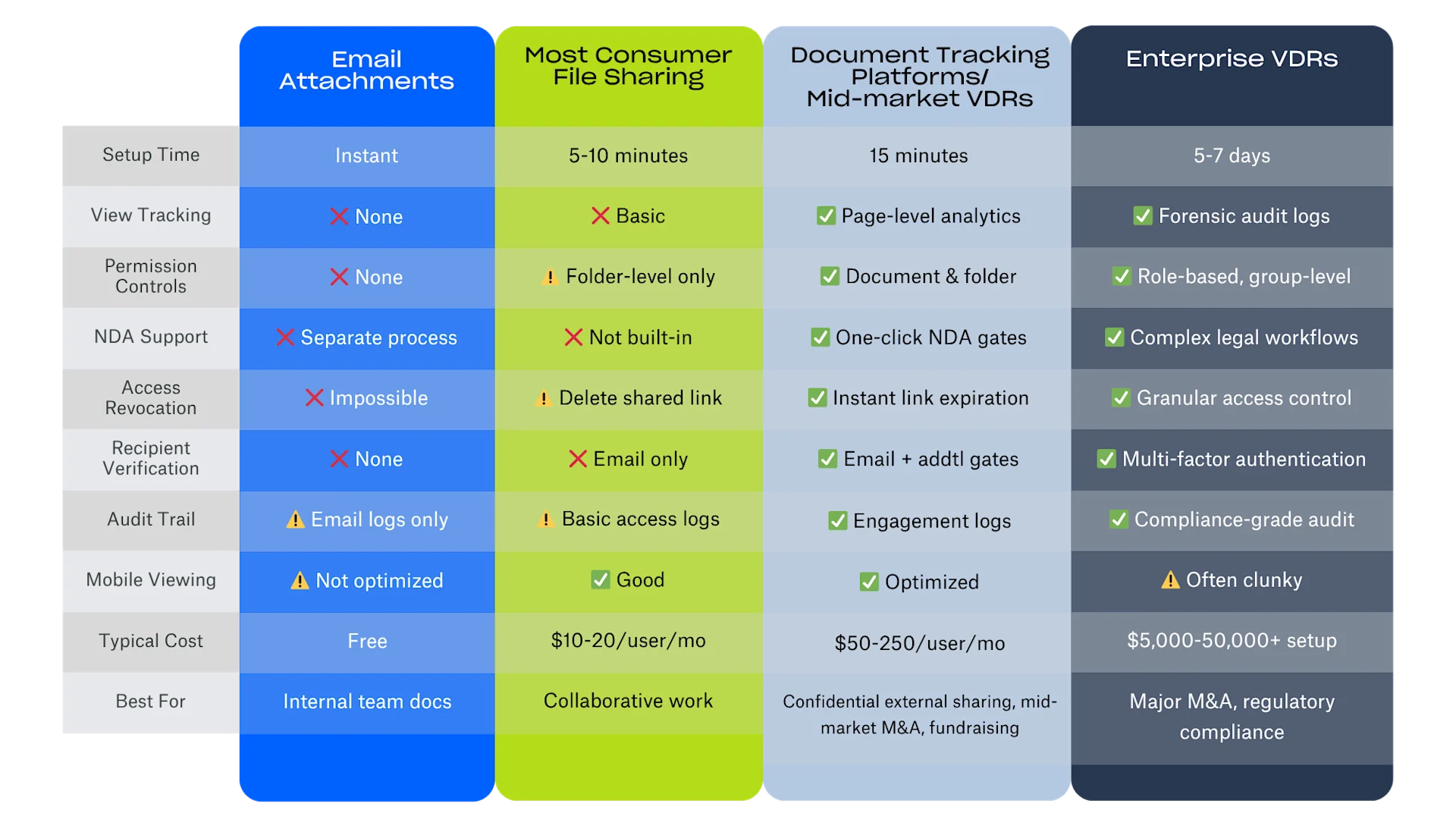
Not every document needs enterprise-grade security, but high-stakes communications demand more than email. Here's the decision framework:
Document sharing method comparison
Decision Tree: Which Tool Should You Use?
Use email when:
Sharing non-confidential information with internal team
Document has no competitive sensitivity
No need to track engagement
Already have secure internal email infrastructure
Use consumer file sharing when:
Collaborative editing is required
Long-term document storage is the goal
Sharing with people who need ongoing access
Document isn't competitively sensitive
Use document tracking platforms (DocSend, etc.) when:
Sharing confidential information externally
Need to track recipient engagement and behavior
Want to control access (expiration, email verification, NDA gates)
Need quick setup (same day) without IT involvement
Want to know who's seriously interested vs. casually browsing
Document contains competitive intelligence or sensitive business data
Need professional presentation for high-stakes communications
Use Enterprise VDRs when:
Major M&A transactions (typically $100M+)
Cross-border deals requiring data residency
Need specialized regulatory certifications
Hundreds of users with complex permission hierarchies
Legal hold or litigation support features required
Industry regulations mandate specific audit capabilities
The key insight: Most business documents fall into the middle category—too sensitive for email or basic file sharing, but not complex enough to justify enterprise VDR cost and setup time. That's where modern secure document sharing for business platforms create value.
How modern document tracking with a virtual data room actually works
Wondering how to share confidential documents with both security and intelligence? Here's the workflow:
1. Upload & organize (2 minutes)
Upload your PDF, PowerPoint, or other document. Organize into folders if sharing multiple documents. No special formatting required—the platform optimizes viewing for any device. Platforms like DocSend also allow for automated organization with features like AI Organize.
2. Set access controls (1 minute)
Choose your security level:
Email verification: Recipient must verify their email before access
One-click NDA: Built-in non-disclosure agreement they must accept
Passcode protection: Additional password layer for extra security
Link expiration: Auto-revoke access after set time period
Download restrictions: Allow viewing but prevent downloads
3. Send secure link (30 seconds)
Instead of attaching a document, send a secure link. Your recipient gets a professional viewing experience that works on any device—desktop, tablet, mobile—without downloads or special software.
4. Track engagement in real-time (ongoing)
See exactly when your document was accessed, how long each viewer spent on each page, and whether they returned multiple times. This intelligence transforms how you follow up:
High engagement (10+ minutes, multiple visits) → This person is genuinely interested, prioritize follow-up
Quick skim (2 minutes, single visit) → They're doing initial evaluation, might need more context
No open after 48 hours → Send a gentle reminder or reassess interest level
Specific page focus → They spent 8 minutes on pricing → Address pricing questions proactively
5. Follow up intelligently (when it matters)
Instead of generic "did you get my email?" follow-ups, you can say: "I noticed you spent significant time on our pricing structure—happy to walk through how we arrived at those numbers" or "Looks like you reviewed the technical requirements—let me know if you need any clarification on integration complexity."
This transforms document sharing vs file storage from passive distribution to active intelligence gathering.
Frequently Asked Questions
What is the most secure way to share documents?
The most secure way to share confidential business documents is using dedicated secure document sharing tools that combine multiple protection layers:
Recipient verification via email gates (confirms identity before access)
One-click NDA or terms acceptance (legal protection before viewing)
Link expiration (automatic access revocation after set period)
Detailed audit trails (forensic record of who accessed what, when)
Permission-based controls (granular access for different recipients)
Email fails on all five criteria. Consumer file sharing provides basic security but lacks recipient verification, built-in NDAs, and detailed analytics. Enterprise VDRs provide maximum security but are overkill for most business documents and take days to set up.
For most high-stakes business documents—term sheets, board materials, M&A teasers, partnership proposals—modern document tracking platforms like DocSend provide the right balance of security, speed, and intelligence.
How can I track if someone opened my document?
Document view analytics platforms show you exactly:
When your document was accessed (date, time, timezone)
Who accessed it (email address, verified identity)
How long they spent viewing (total time on document)
Which pages held their attention (page-by-page engagement)
How many times they returned (single view vs. multiple visits)
What device they used (desktop, mobile, tablet)
This intelligence is impossible with email attachments or basic file sharing. You need purpose-built document tracking software that treats every document share as an intelligence-gathering opportunity, not just a one-way file transfer.
Practical applications:
Sales: Know when prospects view proposals, prioritize hot leads
Fundraising: See which investors are seriously evaluating vs. casually browsing
M&A: Track buyer engagement to gauge deal momentum
Partnerships: Identify which stakeholders reviewed which sections
Why shouldn't I use email for confidential documents?
Email attachment security risks include:
No forwarding control: Once sent, your document can be forwarded infinitely without your knowledge
Impossible access revocation: You can't "unsend" a document if terms change or deal falls apart
Zero tracking: No visibility into whether key decision-makers actually reviewed the document
No recipient verification: Can't confirm the intended person (vs. assistant, shared account) accessed it
No audit trail: Can't prove who viewed what for compliance or governance purposes
Version confusion: Multiple versions circulate with no way to ensure everyone has current terms
Permanent copies: Documents live in inboxes forever, even if outdated or irrelevant
For internal team communication, email is fine. For external sharing of confidential information, alternatives to email attachments provide necessary control, intelligence, and security.
The cost of a term sheet leak, premature M&A disclosure, or competitive intelligence exposure far exceeds the investment in proper confidential document sharing infrastructure.
What's the difference between file storage and document sharing?
File storage is optimized for:
Collaborative editing and co-authoring
Long-term document archival and organization
Team workspace synchronization
Version history tracking
Large-scale enterprise file management
Document sharing platforms/VDRs like DocSend are optimized for:
One-way distribution of confidential information
Recipient behavior tracking and engagement analytics
Access control and permission management
Professional presentation to external stakeholders
Temporary, revocable access to sensitive materials
The use case difference: Use file storage when you and your team need to collaborate on documents over time. Use document sharing when you need to distribute confidential information to external parties (investors, partners, buyers) with tracking, security controls, and professional presentation.
Think of it this way: Dropbox is your filing cabinet. DocSend is your confidential envelope with tracking.
Do I need a full data room or just document sharing?
Use document sharing platforms when:
Sharing 1-50 documents
Need setup completed today, not next week
Under 50 recipients accessing information
Deal size under $100M
Don't require industry-specific compliance certifications
Want engagement analytics, not just compliance logs
Need self-service setup without vendor calls
Graduate to enterprise VDRs when:
Sharing 500+ documents requiring complex folder hierarchies
Need SOC2, FINRA, HIPAA, or other regulatory certifications
Cross-border M&A requiring specific data residency
Deal size exceeds $100M with extensive due diligence
Need role-based access for 100+ users across multiple organizations
Require legal hold or e-discovery features
IT security policies mandate specific vendor certifications
The middle ground: Most fundraising, business development, and middle-market M&A falls between "email is fine" and "we need a $50K VDR implementation." That's where simple data room software creates value—giving you professional, secure document distribution without enterprise complexity or cost.
Can I see who downloaded my document?
Yes. Modern document tracking and simple data room software shows you:
Complete list of who accessed your document (verified emails)
Whether they downloaded a copy (vs. viewing only in browser)
How many times they downloaded
From which device/location they accessed
Timestamp for each download event
This creates a detailed audit trail for documents that's impossible with email. You can prove who had access to confidential information, when they accessed it, and what actions they took.
This becomes critical in:
Legal disputes: Prove document was delivered and reviewed
Governance compliance: Show board members reviewed materials before voting
Due diligence: Demonstrate which buyers accessed which documents
Confidentiality breaches: Track exactly who had access before a leak
Many platforms also let you restrict downloads entirely—allowing viewing but preventing local copies. This is particularly useful for early-stage sharing when you want information control.
How do I know if my document is being forwarded?
Traditional secure document sharing prevents unauthorized forwarding through:
Link-based access (not attachments): Recipients view documents through a secure link, not a downloadable file they can forward
Email verification gates: Each new viewer must verify their email address before access, creating an access log
Individual tracking links: Generate unique links per recipient to see exactly who shared with whom
Download restrictions: Prevent creation of shareable copies
Link expiration: Automatic revocation after set time period
While you can't prevent someone from taking a screenshot or retyping information (that's true of any medium, including physical paper), you can:
Make forwarding significantly harder (vs. one-click email forward)
Create documented trail of who accessed the information
Revoke access immediately if you suspect unauthorized sharing
See exactly when and where unauthorized access occurred
This is why permission-based document access is the standard for confidential business communications like term sheets, M&A teasers, and board materials.
Making the Switch: From email to intelligent document sharing
If you've been using email for confidential documents because that's the simplest or quickest approach, you're not alone. But that doesn't mean it's the right approach for high-stakes communications.
The ROI of document intelligence
Consider the time cost of guessing:
Without tracking: Send proposal → wait 3 days → send "just checking in" email → wait 2 more days → schedule call → discover they never actually read it
With tracking: Send proposal → see they viewed it and spent 10 minutes on pricing → send targeted follow-up addressing pricing questions → schedule call while momentum is hot
The second scenario closes deals weeks faster, reduces wasted follow-up effort, and provides intelligence that shapes conversations.
The hidden cost of lost control
Email is cheap until something goes wrong:
Term sheet forwarded to competitor: Deal dead
Board materials leaked pre-announcement: Regulatory investigation
M&A teaser reaches press: Valuation impact
Partnership proposal shared with rival: Competitive disadvantage
Secure file sharing for business isn't about adding cost—it's about avoiding much larger costs hidden in poor information control.
The competitive advantage of speed + intelligence
While your competitor waits a week for their enterprise VDR to be implemented by IT, you're already sharing documents and gathering intelligence. While they're guessing which buyers are engaged, you're seeing real-time analytics and prioritizing hot prospects.
This isn't just about security. It's about velocity—moving faster than competitors while maintaining control and gathering intelligence that shapes strategy.
Get started with secure document sharing
Ready to move beyond email for confidential documents? Here's your path forward:
Immediate actions (Next 24 hours)
Audit your current document sharing: Identify which documents you've sent via email in the last 30 days that contained confidential information
Assess the risk: Consider the competitive or regulatory impact if those documents were forwarded to unintended recipients
Prioritize use cases: Start with your highest-stakes documents (term sheets, board materials, M&A documents)
First Implementation (Next 7 Days)
Set up your first tracked document share: Choose your next high-stakes document (upcoming term sheet, board packet, partnership proposal)
Configure appropriate security: Email verification, NDA requirements, link expiration based on document sensitivity
Monitor engagement: See how tracking changes your follow-up strategy
Building the Habit (Next 30 Days)
Create templates: Standard folder structures for recurring documents (monthly investor updates, board materials, sales proposals)
Train your team: Show colleagues how tracking improves follow-up efficiency
Measure results: Compare close rates, follow-up efficiency, and time-to-deal on tracked vs. untracked documents
The Bottom Line
The pitch deck was just the beginning. Every confidential document you share with external stakeholders—term sheets, board materials, M&A teasers, partnership proposals, executive compensation, due diligence documents, investor updates—deserves better than email.
Not because email is bad for everything. It's perfect for internal team communication and non-sensitive information. But for high-stakes business documents where you need control, intelligence, and professionalism, secure document sharing for business and virtual data rooms have become the new standard.
The question isn't whether you'll eventually make the switch. The question is whether you'll make it before your competitor does—and gains the velocity advantage of knowing exactly who's engaged, who's interested, and who's ready to close.
Ready to see how document intelligence transforms your high-stakes communications? Try DocSend free (no credit card required) for 14 days—no IT approval needed, no complex setup, just upload a document and start gathering insights.
Informazioni sull'autore