How to track investor engagement with DocSend and AI
Discover how to read investor interest before your next meeting with DocSend engagement data. Use AI to prepare, identify what investors care about, and walk in confident.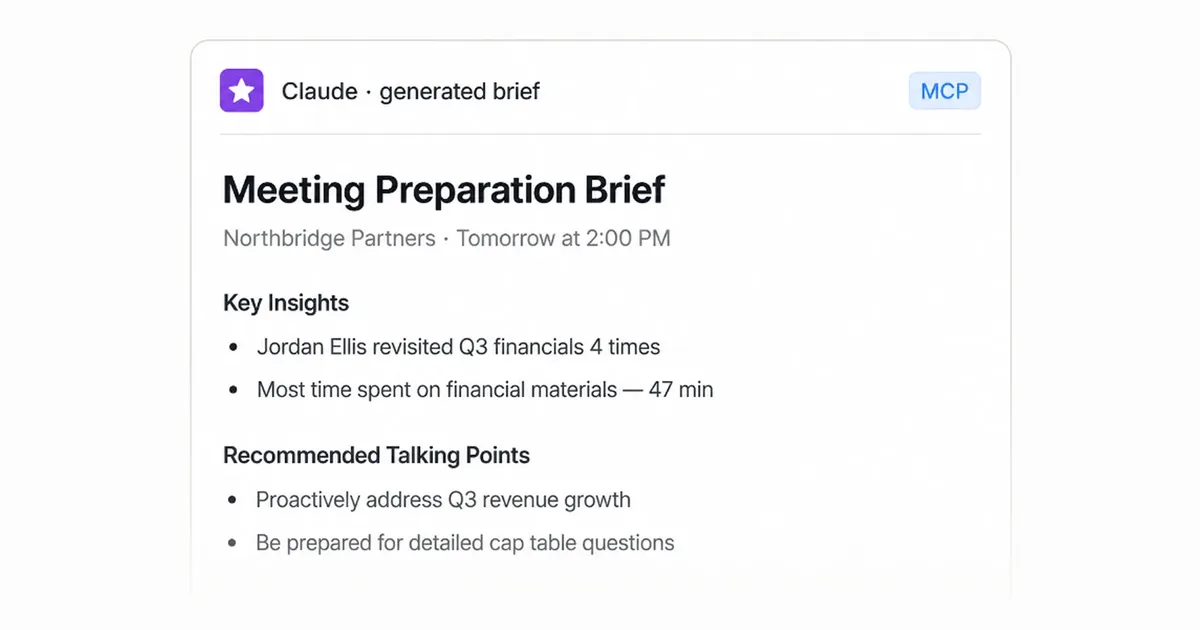
Stop sending your pitch deck into a black hole
You sent your pitch deck three days ago. The investor confirmed the meeting, but you still don't know if they opened it, which slides they cared about, or whether they even read past page two. You're about to walk into that meeting with no idea what they're actually thinking.
That's the problem. When you share confidential documents through basic file sharing, you get nothing back. No signal. No insight. No way to prepare. You end up guessing what matters to the person sitting across the table from you.
We change that. With our document tracking and page-level engagement analytics, you can see exactly which investors viewed your deck, how long they spent on each slide, and which sections they returned to. And with the Model Context Protocol (MCP), you can pull that engagement data straight into your AI tools to prepare for your next meeting with precision.
In this guide, we'll walk you through how to read investor interest using DocSend engagement data, how to use the MCP to bring that data into AI, and how to prepare for your meeting so you walk in knowing exactly what your investor cares about.
What DocSend engagement data tells you
When you share a pitch deck, a confidential information memorandum (CIM), or any deal document through DocSend, you get real-time visibility into how your audience engages with it.
Whether you're reviewing pitch deck examples for inspiration or sharing your own materials for secure document sharing, here's what you can track:
See who’s viewing your materials. Require an email address to identify the investors or buyers opening your documents.
Understand where they spend time. Page-level analytics show which slides or sections receive more viewing time and which get a quick glance.
Spot repeat engagement. See when visitors return to your document and which pages they spend time on across visits.
Know when they engage. Visit timestamps show whether they opened your deck right after you sent it or just before your meeting.
Identify additional viewers. With email required, see when someone new opens your shared link, a potential sign your materials are circulating within their team.
These data driven insights turn a guessing game into a strategy. Instead of wondering whether your pitch landed, you know.
How to read the signals: what investor behavior reveals
Engagement data is only useful if you know how to interpret it. Here's how to read the signals:
High time on speci0fic slides
If an investor spends three minutes on your financial projections slide and 10 seconds on your team page, they care about the numbers. Prepare to walk through your revenue model, margins, and growth assumptions in detail.
Repeated views of the same section
When someone comes back to a slide two or three times, they're either confused or deeply interested. Either way, that section is a priority. Be ready to address it head-on.
Quick scan with no revisits
If they opened the deck once, flipped through in under a minute, and never came back, you may be dealing with a low-priority meeting. Adjust your expectations and focus on making a strong first impression.
Forward to additional viewers
If they shared your deck with two partners and an analyst, you're no longer pitching to one person. You're pitching to a committee. Prepare materials that work for different levels of familiarity with your space.
No views at all
If the investor hasn't opened your deck before the meeting, don't panic. Some investors prefer to hear the pitch live. But you should be ready to walk them through everything from scratch, and consider sending a follow-up link during the meeting so you can track their engagement in real time.
Using the Model Context Protocol (MCP) to bring engagement data to AI
The Model Context Protocol (MCP) is an open standard that lets AI tools connect to external data sources. Our MCP integration means you can query your engagement data directly from an AI assistant and use it to prepare for your meeting.
Here's how it works:
Connect DocSend to your AI tool via MCP. Once connected, your AI assistant can access your document engagement data securely.
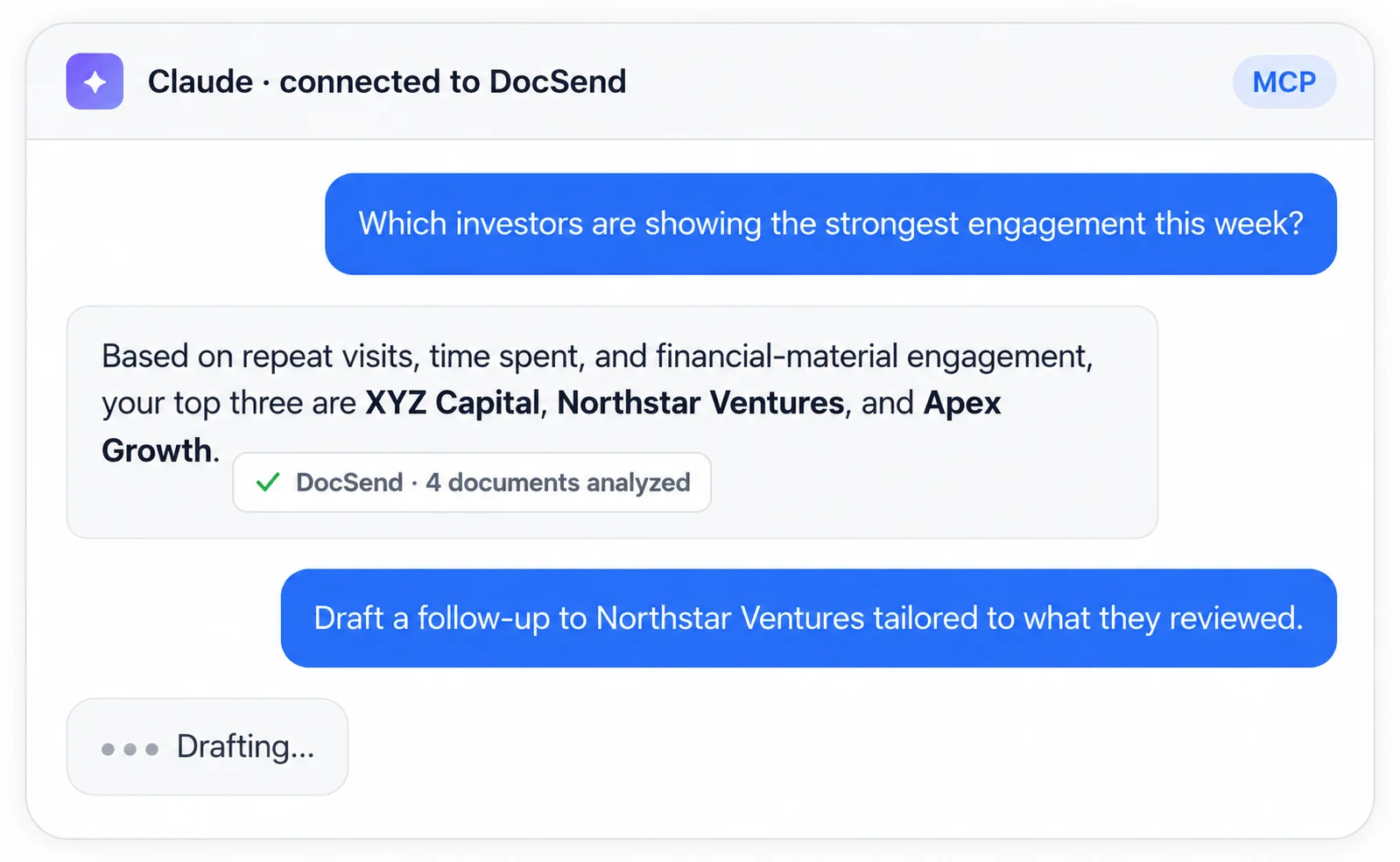
Ask your AI tool questions about the data. For example, you might ask: "Which slides did this investor spend the most time on?" or "What topics appear to matter most based on engagement patterns?"
Get instant analysis. Your AI tool can summarize engagement patterns, identify the sections that drove the most attention, and suggest talking points based on what the data shows.
Prepare a tailored agenda. Use the AI-generated insights to build a meeting agenda that prioritizes the topics your investor cares about most.
The MCP removes the manual work of digging through analytics dashboards. Instead of sorting through page-by-page data yourself, you get a clear, AI-prepared summary of what your investor is thinking before you walk into the room.
How to prepare for your meeting using AI
Once you have your engagement data flowing through the MCP, here's how to use AI to prepare for your meeting step by step.
Step 1: Pull your engagement summary
Ask your AI tool to generate a summary of how the investor engaged with your document.
Focus on:
Which pages received the most attention
Which sections were revisited
How many people on the investor's team viewed the document
When the engagement happened relative to your meeting
Step 2: Identify priority topics
Based on the engagement data, ask your AI tool to identify the three to five topics that matter most to this investor. For example, if they spent significant time on your market size slide and your competitive landscape slide, those are your priorities.
Step 3: Draft talking points
Have your AI tool draft talking points for each priority topic. Keep them concise and specific:
What question is the investor likely to ask about this topic?
What data or evidence can you share to address it?
What objection might they raise, and how will you respond?
Step 4: Prepare your materials
Organize your supporting materials so they're ready to share during the meeting. If the investor focused on financials, have your detailed revenue model accessible. If they cared about your competitive moat, prepare a comparison chart. Our document sharing platform lets you share these securely with granular access controls, so you stay in control of your confidential information.
Step 5: Rehearse with AI
Use your AI tool to run a mock meeting. Share your talking points and ask the AI to role-play as the investor, asking follow-up questions based on the engagement patterns you identified. This helps you refine your answers and build confidence before the real conversation.
For M&A and financial services professionals
The same principles that help founders read investor interest apply directly to mergers and acquisitions (M&A) advisors, investment bankers, and private equity professionals. In fact, the stakes are often higher.
Read buyer interest in your deal room
When you share a CIM or deal materials through a virtual data room, our engagement analytics tell you which buyers are serious. If a potential acquirer spends hours reviewing your financial statements and operational data, they're doing real due diligence. If they skim the executive summary and move on, they may not be a serious buyer.
Streamline due diligence with engagement data
During due diligence, document tracking shows you exactly which files buyers are reviewing and which ones they're ignoring. This helps you:
Anticipate questions before anyone asks them
Identify which buyers are advancing and which are stalling
Follow up at precisely the right moment, based on when buyers engage with your materials
Use virtual data room software that works for mid-market deals
Legacy virtual data rooms take weeks to deploy, charge per-page costs that spiral, and offer clunky interfaces that frustrate everyone involved. We give you a modern, secure data room you can deploy in minutes, with real-time engagement analytics that legacy virtual data rooms can't match. You get enterprise-grade security from day one, including System and Organization Controls 2 (SOC 2) and General Data Protection Regulation (GDPR) compliance, without the overhead of a traditional data room provider.
Prepare for deal meetings using AI
Just as founders use the MCP to prepare for investor meetings, M&A professionals can use it to prepare for buyer meetings. Pull engagement data from your deal room into your AI tool, identify which sections of your CIM drove the most attention, and prepare a meeting agenda that addresses the buyer's actual priorities.
Best practices for founders and financial services professionals
Whether you're pitching to investors or managing a mid-market transaction, these practices will help you get the most out of DocSend engagement data and AI preparation:
Send your documents early. Give your audience time to engage before the meeting. The more data you collect, the better prepared you'll be.
Use a non-disclosure agreement (NDA) to protect sensitive materials. Before sharing detailed financials or proprietary information, use DocSend to send and track the NDA. You'll see who signed and when, so you maintain control over your confidential documents.
Organize your documents with clear structure. Use separate links for different document types so you can track engagement at a granular level. This makes it easier to identify which materials are driving interest.
Check engagement before every meeting. Make it a habit to review your engagement data 24 hours before any scheduled conversation. Use the MCP to pull a summary into your AI tool and prepare accordingly.
Follow up based on data, not guesswork. When you see a buyer or investor revisit a specific section, follow up with additional information on that topic. This shows you're paying attention and keeps the conversation moving.
Keep security front and center. Use our granular access controls to manage who sees what. For financial services professionals, maintain complete audit trails for compliance. For founders, keep your pitch deck secure without slowing down your fundraising process.
Why this matters for your next deal
Walking into a meeting without knowing what your audience cares about is a gamble. With DocSend engagement data and AI-powered preparation, you remove the guesswork.
You know which slides captured attention. You know which topics to prioritize. You know who else is involved in the decision. And you've rehearsed your answers to the questions they're most likely to ask.
Whether you're a founder closing your next funding round or an M&A advisor managing a complex transaction, the combination of engagement data and AI gives you an edge that traditional document sharing and legacy virtual data rooms simply can't match.
Stop sending your most important documents into a black hole. Start reading the signals, preparing with AI, and walking into every meeting knowing exactly what your audience cares about.
Ready to see who's really interested in your deal? Start tracking engagement with DocSend today and walk into your next meeting with confidence.
Already using DocSend and ready to use the MCP? Click here.